
Product
Everything your IT department runs, in one service desk
From the first "my laptop won't start" to assets, renewals, outages and planned changes. Each feature shows the plan it comes with.
Service desk
Every request reaches the right person, and nothing is forgotten.
Requests arrive from Teams, email, the web portal, the phone and walk-ins, and land in one queue with the same rules and reports.
Sent to the right IT section automatically
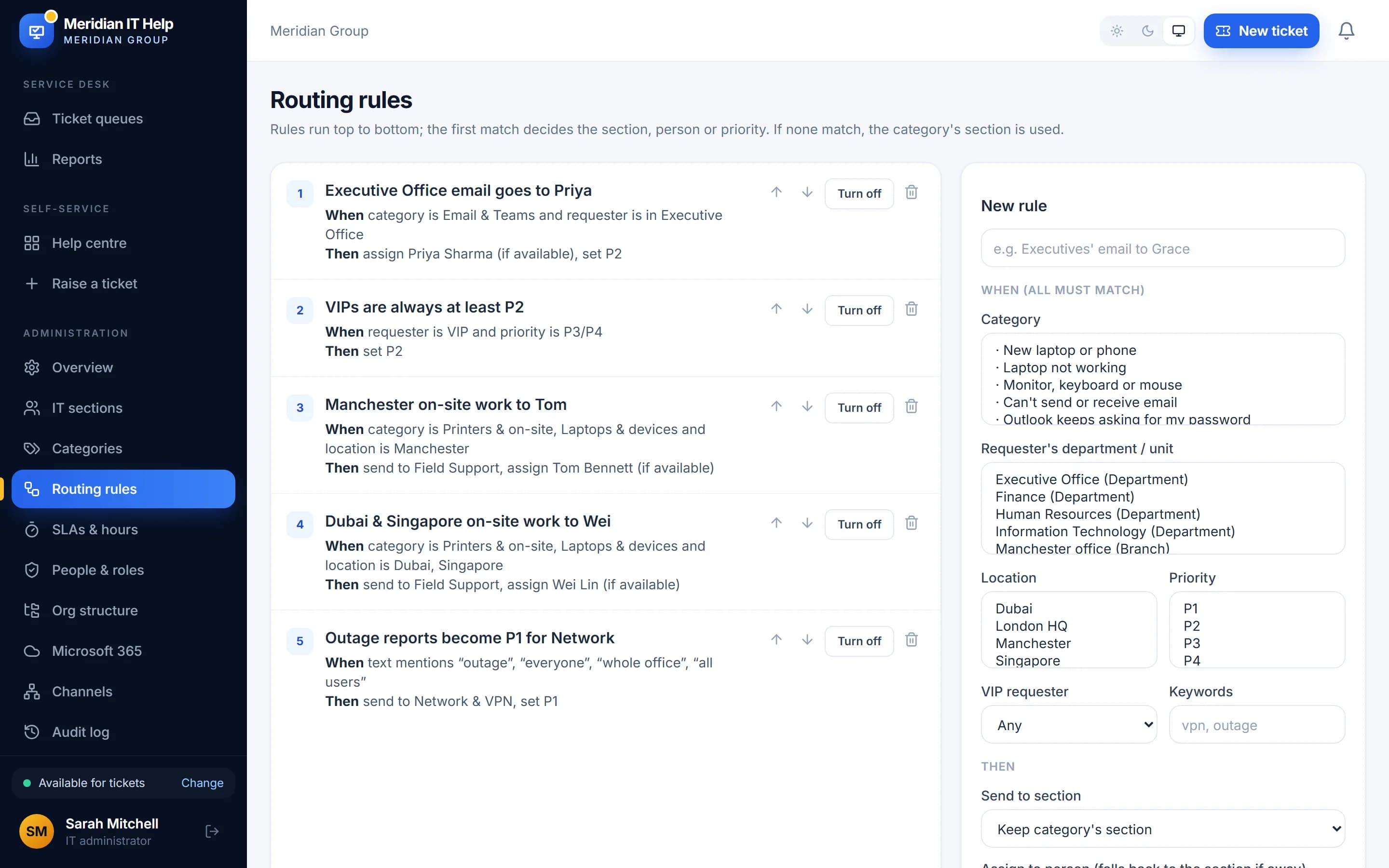
When someone at your Manchester office reports that the printer jams, it goes straight to the technician who covers that site. Nobody has to read and forward it first.
- Organise IT into sections such as Device Setup, Email & Microsoft 365 or Network
- Rules by category, department, location, priority or keywords
- Round-robin or least-busy assignment, skipping people on leave
- VIP requests and critical incidents jump the queue
Clear targets, and early warnings before they are missed
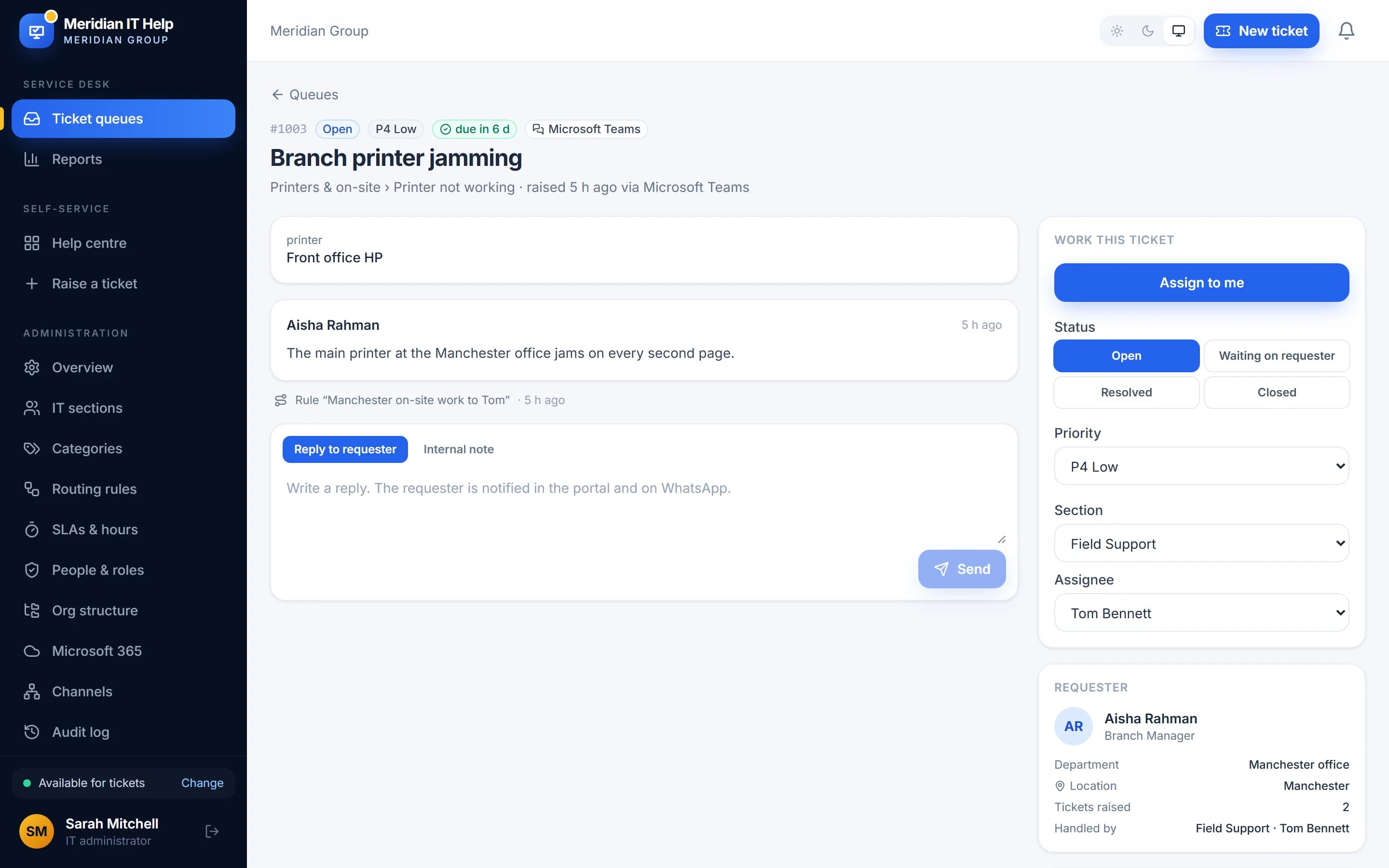
Every ticket shows who raised it, their department and location, how it was routed and how much time is left. Your team works the queue with the full picture in front of them.
- Response and resolution targets for each priority, counted in business hours
- The clock pauses while you wait for the requester
- Warnings at 75% of the time, with alerts to team leads on a breach
- Internal notes your staff never see
A help centre staff understand at a glance
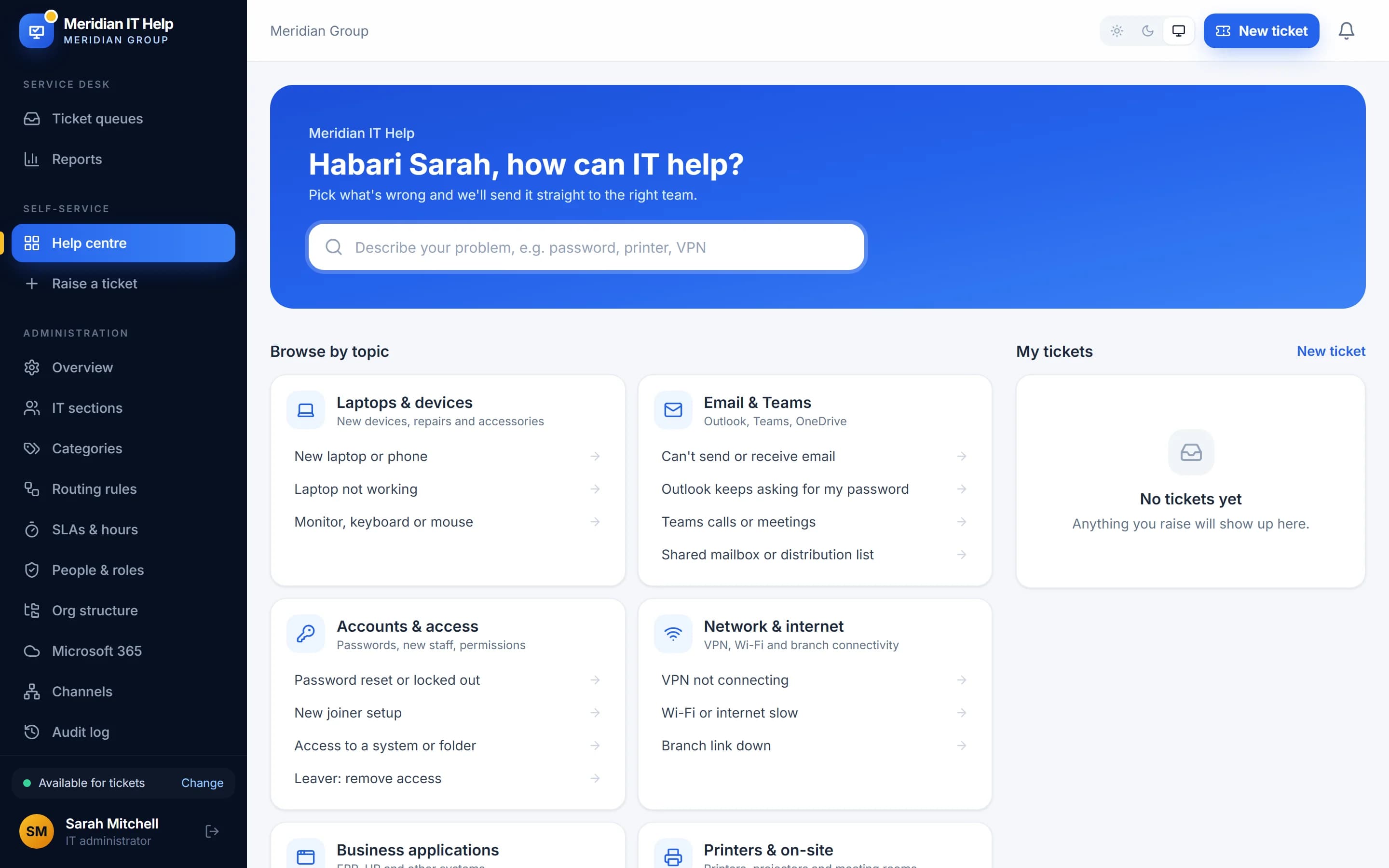
For people who prefer the browser, the portal asks the right questions up front, so IT does not have to chase details like the asset tag or which office the person is in.
- Plain categories with the right questions for each problem
- Staff see every ticket they raised and what is happening
- Replies by email and Teams, so nobody has to keep checking
- Your logo and colours (Business and Enterprise)
Know where the time goes
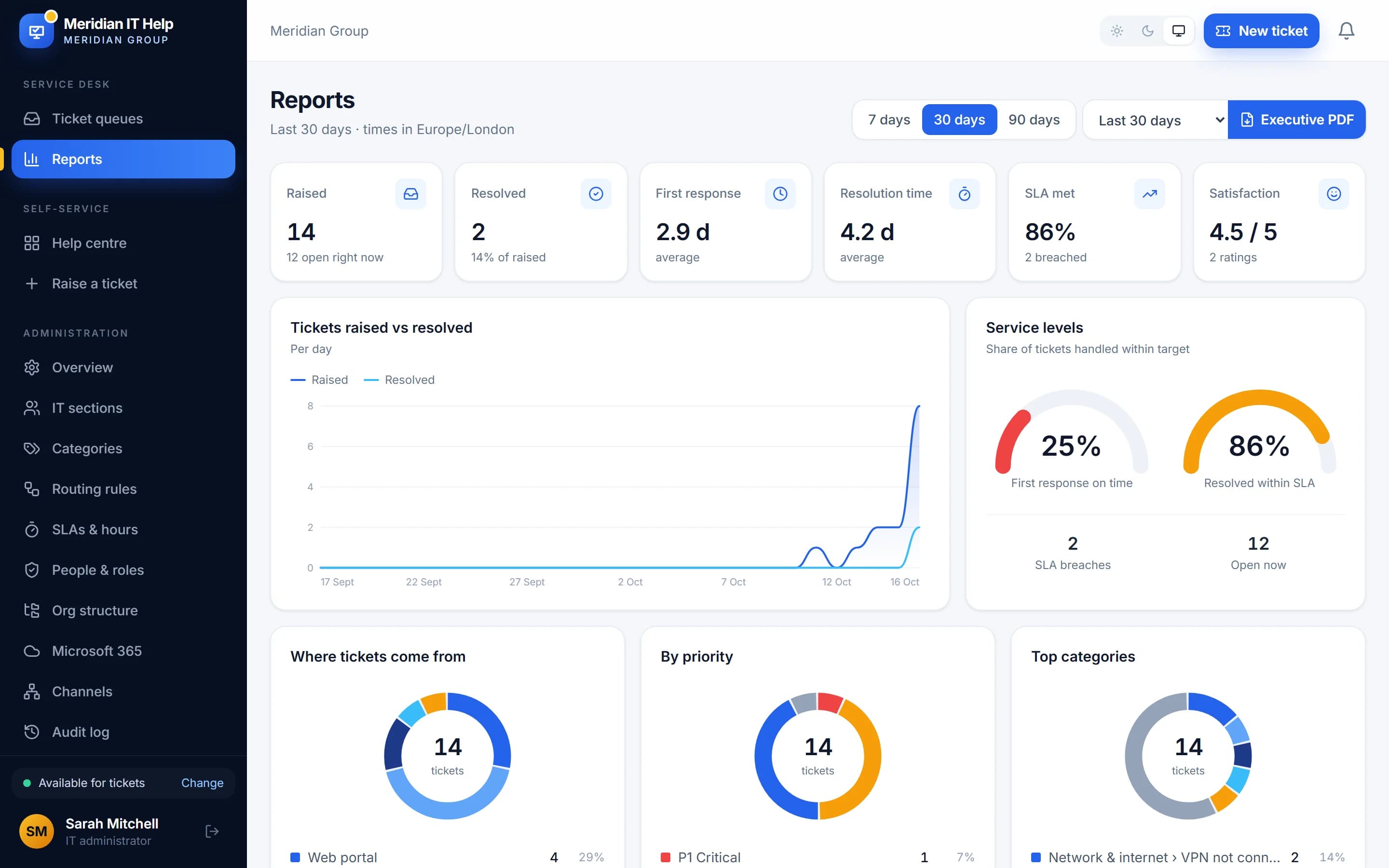
See which departments need the most help, which sections are stretched and how satisfied people are. The numbers you need for your monthly IT report are always up to date.
- Raised vs resolved, response and resolution times
- Where tickets come from: Teams, email, portal, phone or walk-in
- Busiest days and hours, to plan shifts and leave
- Performance by section, technician and department
Microsoft Teams
Chat with the VektaDesk app
helpdesk@yourcompany becomes tickets
Web portal
A simple help centre
Phone & walk-in
Logged by IT in seconds
Microsoft Teams
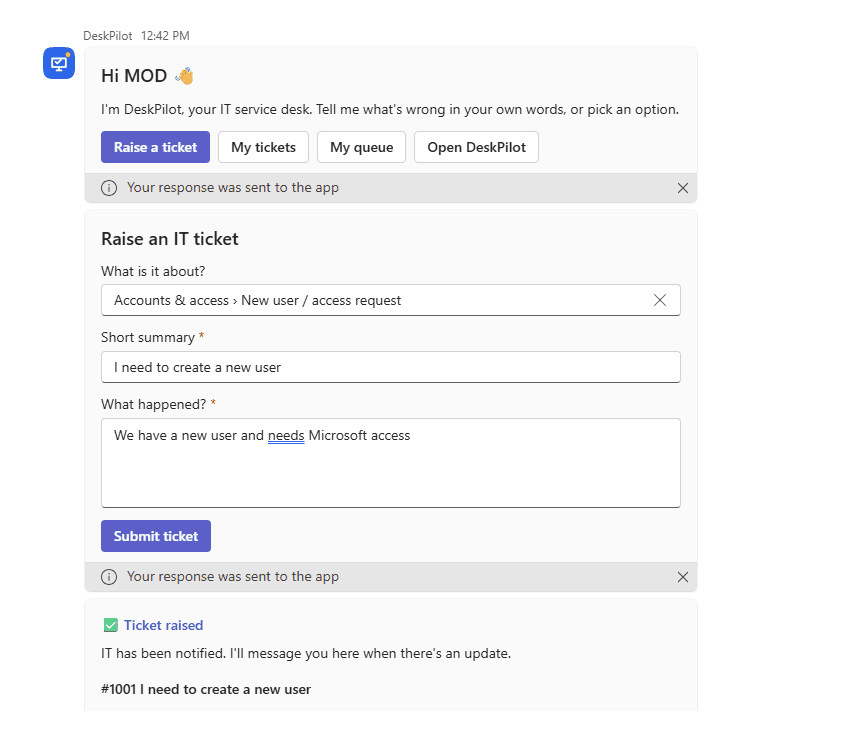
Reporting a problem is as easy as sending a message.
Staff chat with VektaDesk in Teams. They describe the problem in their own words and VektaDesk turns it into a ticket, with the category, summary and details filled in. When IT replies, the answer arrives in the same chat.
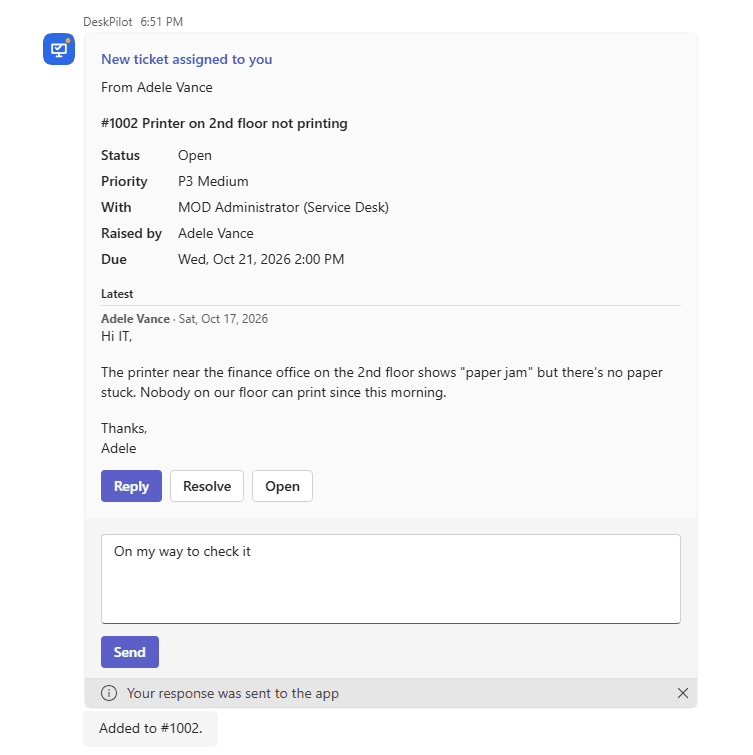
- Raise, follow and reply to tickets without leaving Teams, with smart follow-up questions
- Technicians get assignments with Reply, Take it, Resolve and Team up buttons
- Managers approve or decline requests with one tap
- Team leads get workload, reports and the executive PDF in chat
- Installed for everyone by your Microsoft 365 admin in minutes
Vekta AI
An assistant that does the first draft, so your team can do the fixing
Every agent seat includes 500 Vekta AI credits a month, shared across your team, and you can top up whenever you need more. Your ticket data isn't used to train AI models.
Summaries and replies in seconds, in the requester's language
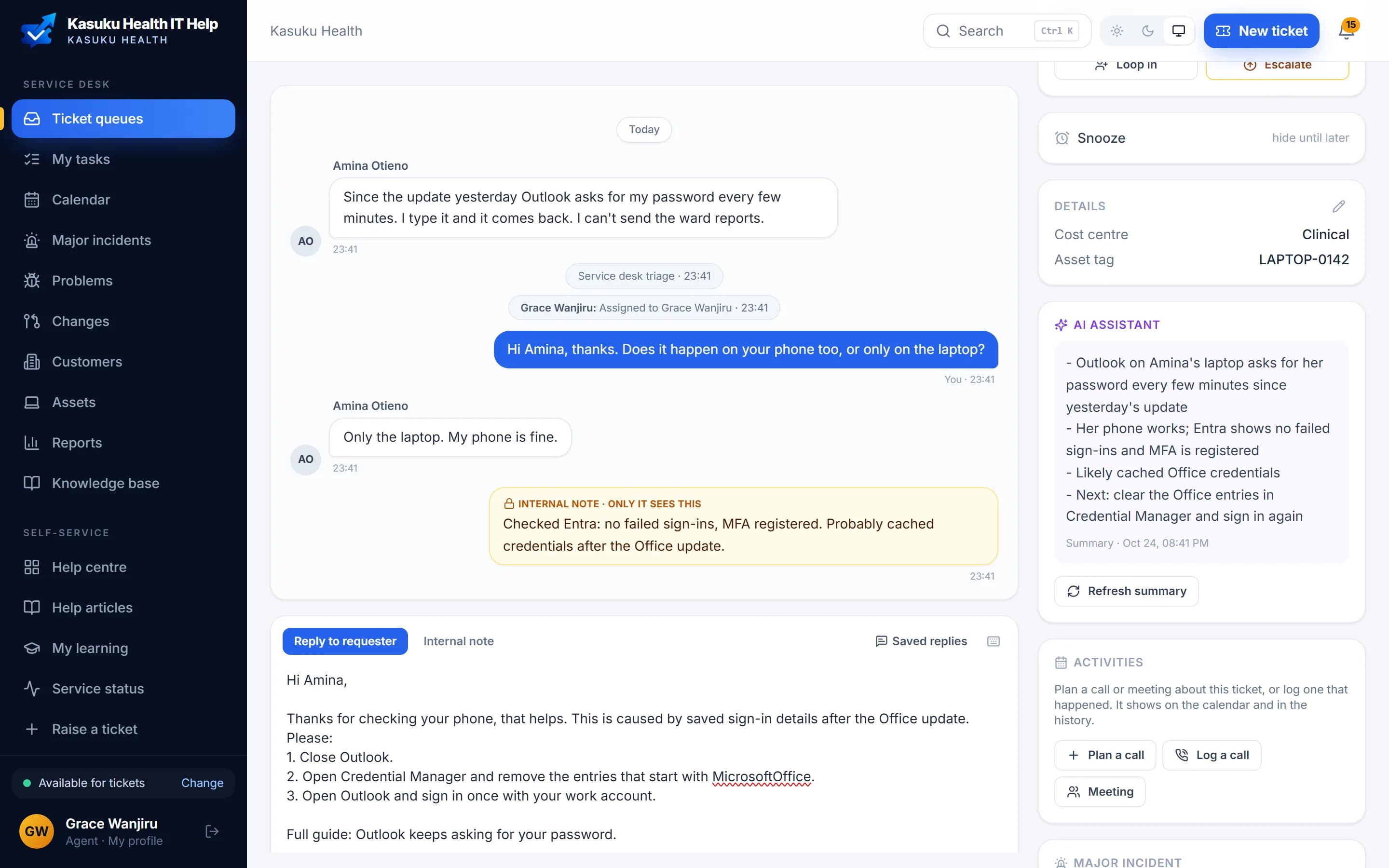
Picking up a long ticket takes a glance, not ten minutes of scrolling. The draft is a starting point: your agent checks it, adjusts it and sends it.
- A short summary of any ticket: the problem, what's been tried and the next step
- Reply drafts that use your help articles, in English, French or Spanish
- Translate your reply with one click
- Category and priority suggestions on new tickets, and help article drafts from solved ones
Answers before a ticket is even raised
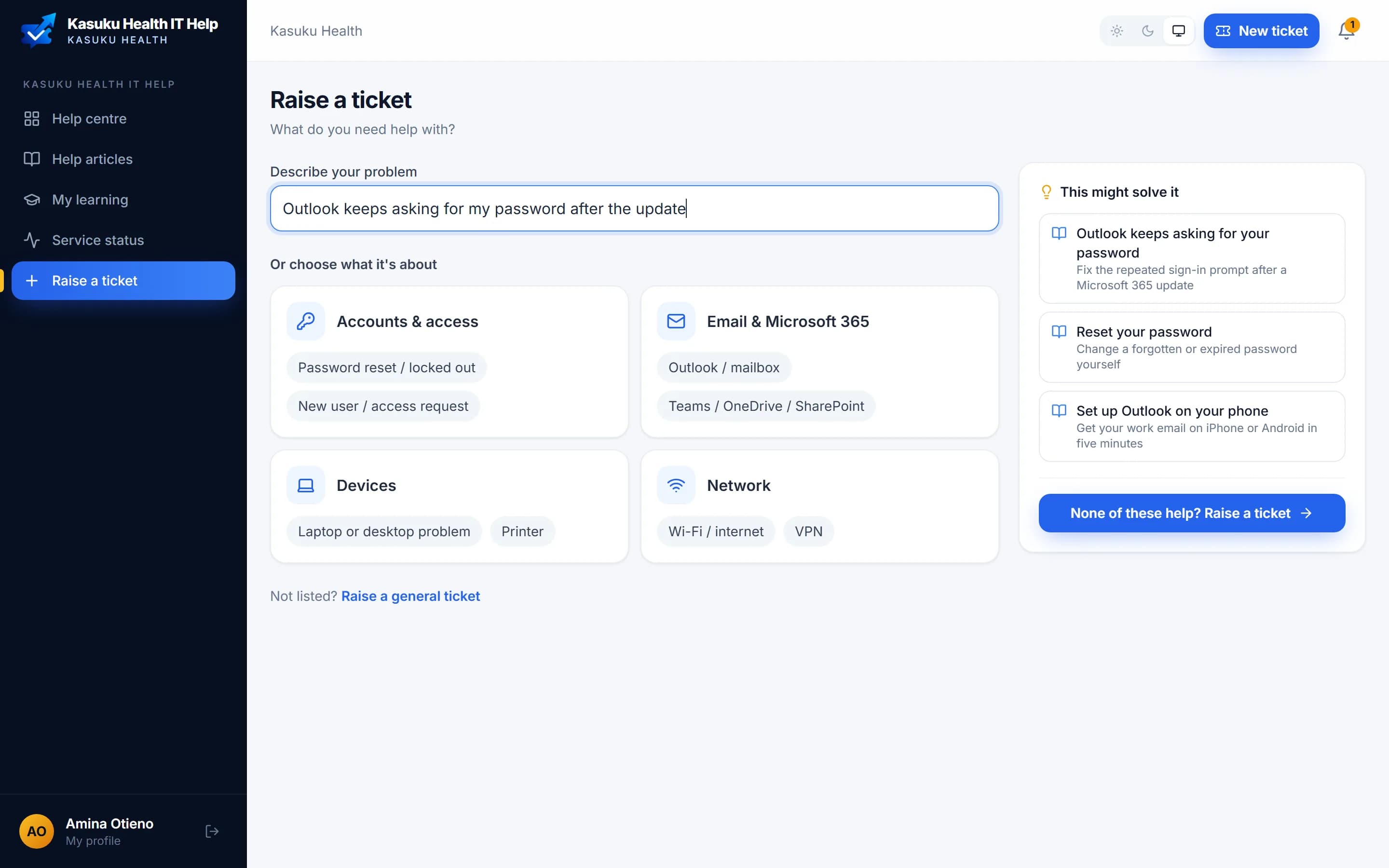
The quick questions answer themselves, and your team gets fewer tickets about things that are already written down.
- As people describe the problem, matching help articles appear beside the form
- A short AI answer written only from your own help articles
- “This solved it” counts as a ticket avoided in your reports
- If nothing helps, their words carry straight into the ticket
IT operations
When something big breaks, everyone hears it once, from you
The processes large IT departments run (major incidents, problems and changes), kept simple enough that a small team actually uses them, and run through Teams.
Major incidents
Business & EnterpriseKnown issue · IT is working on it
Email is down for everyone
Outlook can't send. Use Teams chat for urgent messages.
- Tell the people who reported it, a department or everyone
- A Teams message, a banner in VektaDesk and email
- Updates and the all-clear go to everyone affected
- The all-clear can resolve every linked ticket
Problems
EnterprisePRB-14 · VPN drops every afternoon
9 tickets linked · owner Grace Wanjiru
Known error · Workaround shared
- Spot repeating tickets and link them to one problem
- Root cause, workaround and permanent fix in one place
- Workarounds published as help articles
- Fixing the problem resolves every linked ticket
Changes
EnterpriseCHG-31 · Upgrade core switch firmware
Thu 22 Oct, 18:00 · medium risk · back-out plan ready
Approve · Reject · no freeze
- Standard, normal and emergency changes with risk levels
- Your change advisory board approves in Teams
- Change calendar and freeze periods
- Close each change with a short review
Know every device, and never miss a renewal
Assets, licences and renewals live next to the tickets about them. When Amina reports a slow laptop, the technician already sees which laptop, whether it's compliant and when it last checked in.
- Laptops and phones synced from Microsoft Intune, with compliance and last check-in
- Printable QR labels; scan a QR code, barcode or serial number with any phone camera
- The requester's devices shown on every ticket
- Microsoft 365 licences, domains, SSL certificates, Cisco, Sophos and more, with reminders 60, 30, 7 and 1 day before
- Each renewal opens a ticket, so it is tracked like any other work
| Microsoft 365 Business Premium | 7 days |
| yourcompany.com (domain) | 30 days |
| Sophos Intercept X | 58 days |
| SSL: portal.yourcompany.com | 74 days |
LAPTOP-0142
Dell Latitude 7440 · Windows 11 · used by Amina Otieno · Compliant · Encrypted · checked in today
Adoption & Learning
Roll out Microsoft 365, and know people actually learned it
Write step-by-step guides with screenshots, group them into courses and assign them to a department, a group or everyone. Staff learn in Teams, one module at a time. You see who finished, how long it took and exactly which step people got stuck on, and every stuck step can become a ticket.
- Guides with screenshots: paste one, then draw boxes and arrows on it
- Courses assigned to departments and groups synced from Microsoft 365, or to chosen people
- Deadlines (a date, or days after someone joins), with reminders
- Course notices, reminders and certificates in Teams and in VektaDesk
- Module by module with a Next module button, and time spent tracked per module
- Answers to "Did this step work?" saved, so you see exactly where people get stuck
- A short end-of-course survey: rating, NPS, what worked and what to improve
- Ready-made courses: Outlook, Teams, OneDrive & SharePoint, and Staying secure
- Progress by person and department, with a CSV report for HR and management
- Included in Enterprise for every learner: you still only pay per IT agent
Security awareness training: Staying-secure courses (MFA, phishing, safe sharing) are in the library today.
Training beyond Microsoft 365?
VektaLearn, our training platform, covers compliance, onboarding and policy training for the whole organisation, with simulations, Spot the risk phishing exercises, assessments, certificates and SCORM import.
Automation and reporting
Rules that do the routine work, and reports leadership can use
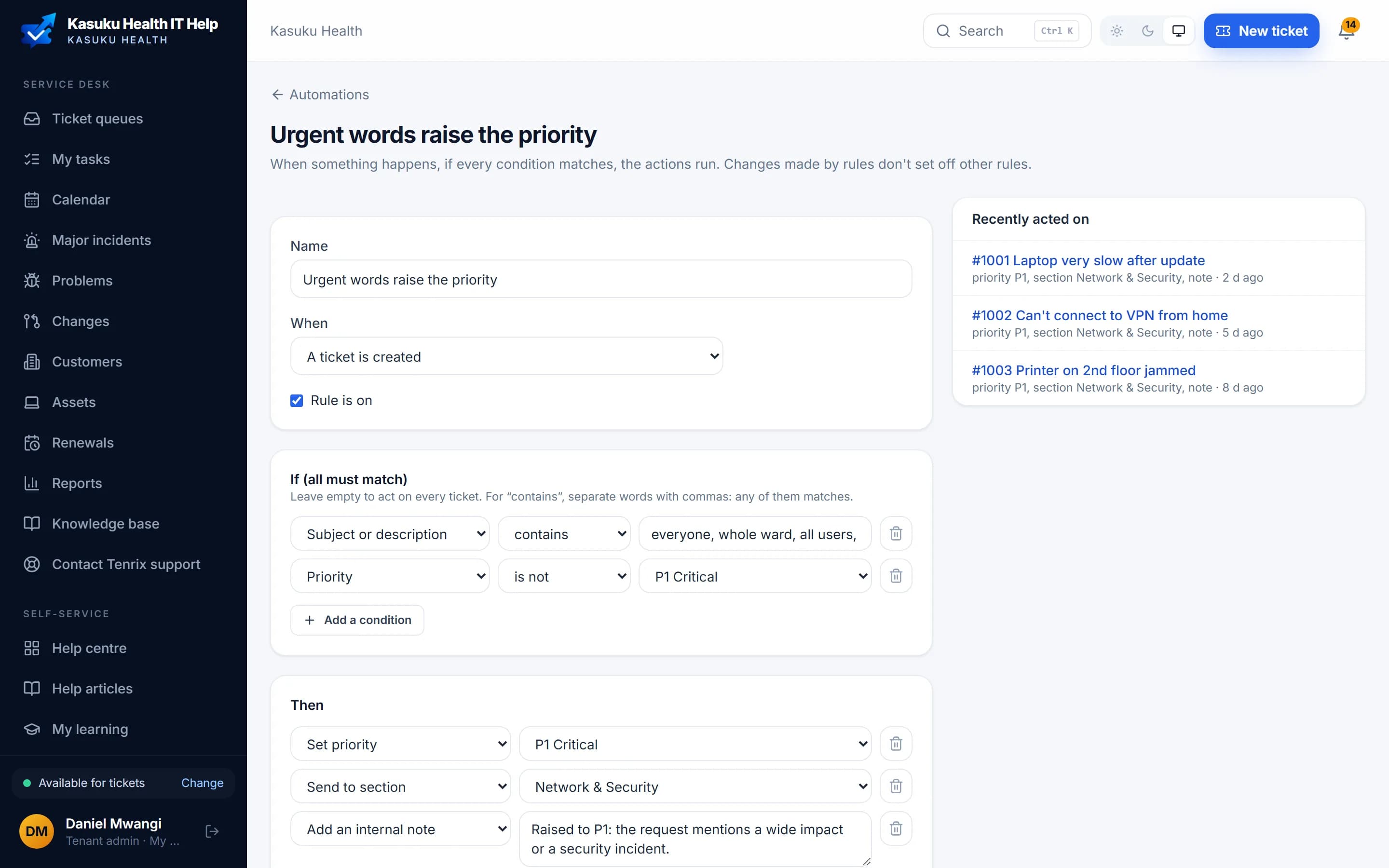
Rules that do the routine work for you
Admins build rules from simple menus, no scripting. Every rule shows what it did and on which tickets, so you always know why something changed.
- When a ticket is created, replied to, changes status or sits untouched
- If the words, category, department, priority, VIP or your own fields match
- Then set priority, send to a section, assign, reply, add a note or notify someone
- Ready-made rules, like closing tickets nobody answered for 5 days
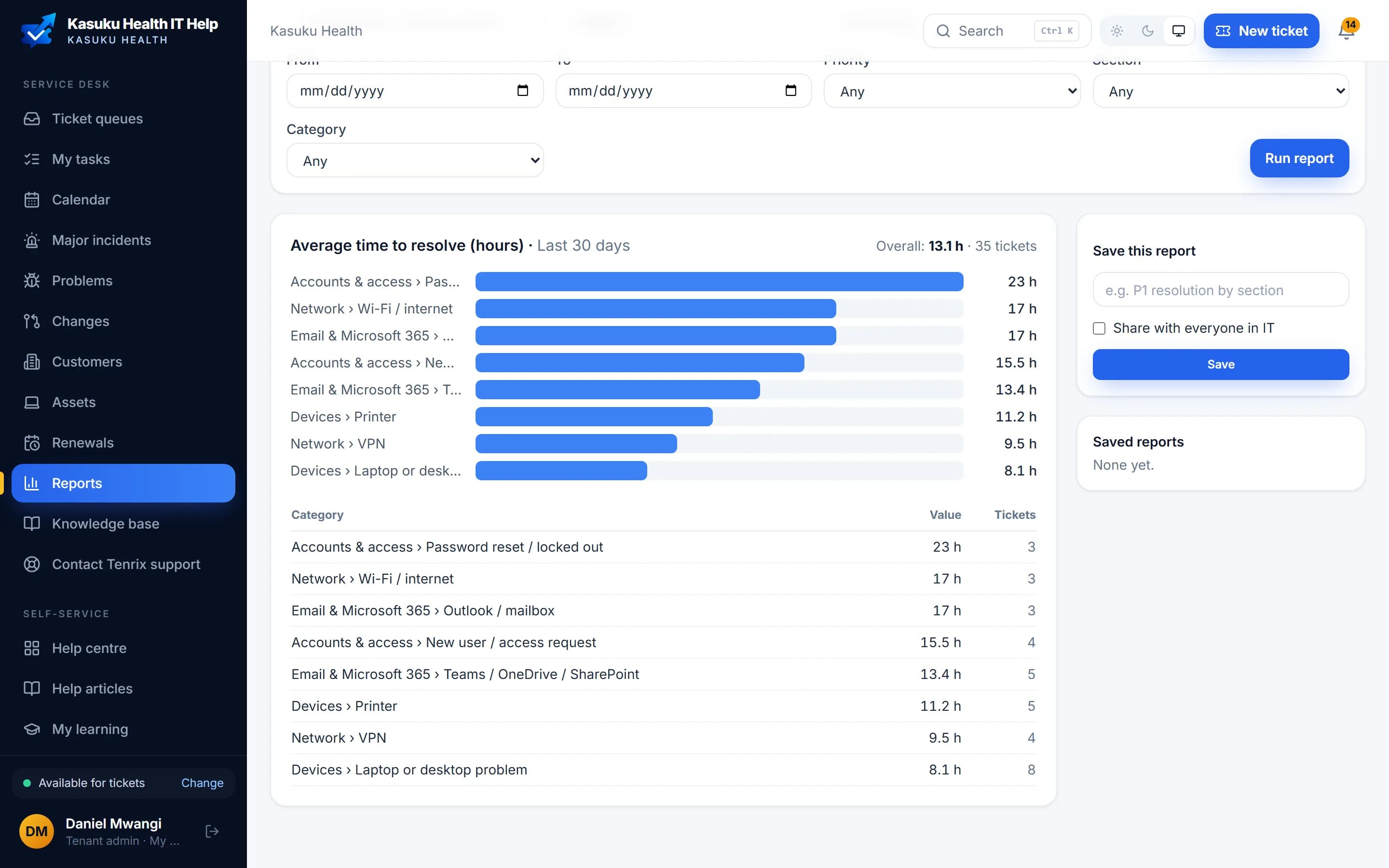
Build the report your board asks for
When management asks how long password resets take, or which category keeps the team busiest, the answer is a few clicks away, not an afternoon in a spreadsheet.
- Pick a measure: tickets raised or resolved, time to resolve, first response, SLA or satisfaction
- Group by day, week, month, category, section, assignee, department or your own fields
- Filter by period, priority, section and category
- Save and share reports, or download them as CSV
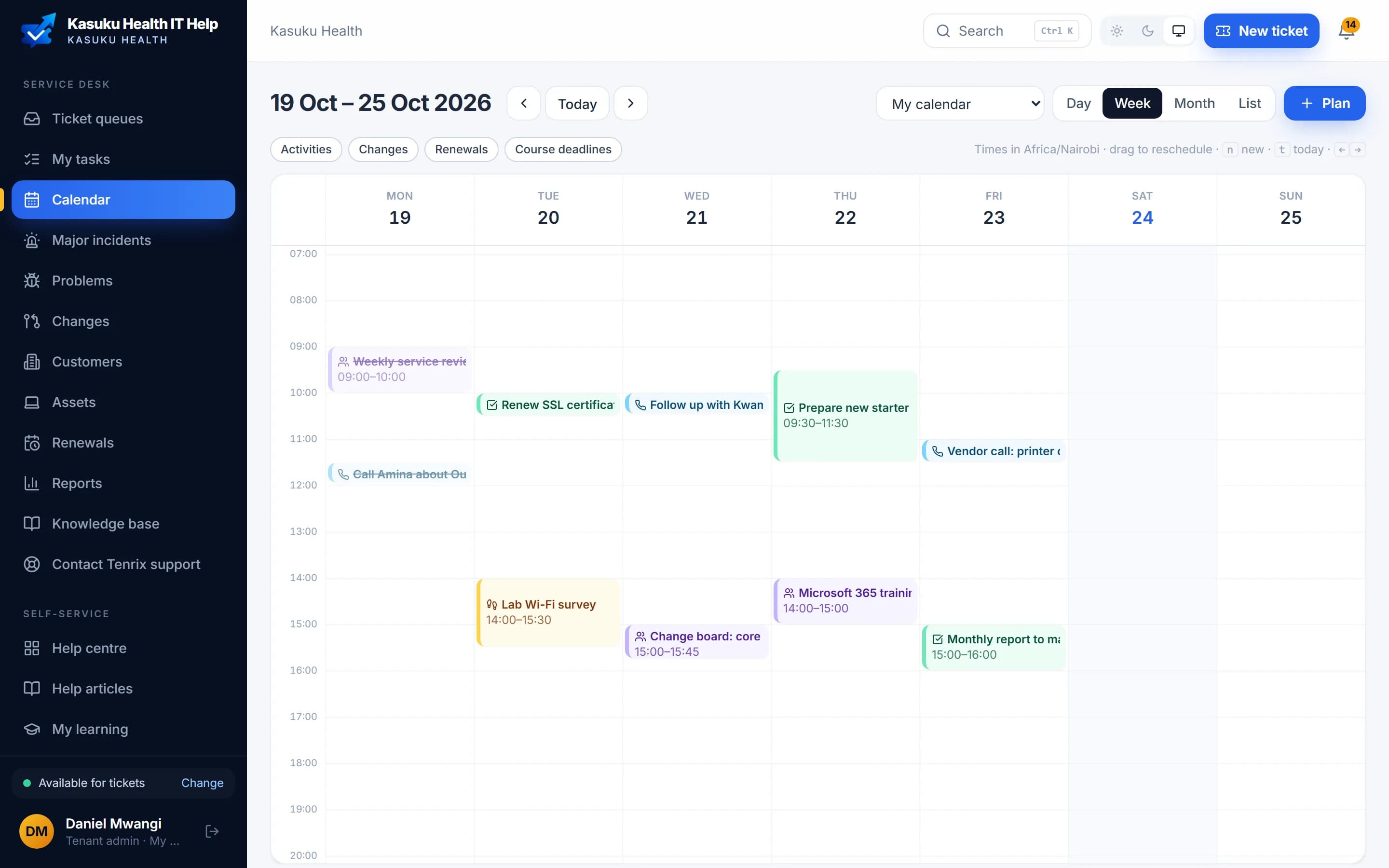
Calls, visits and meetings, planned next to the tickets
Follow-ups stop living in someone's head. The call you promised Amina is on the calendar, linked to her ticket, with a reminder before it starts.
- Plan a call, meeting, visit or task from any ticket
- Day, week, month and list views for you or the whole IT team
- Changes, renewals and course deadlines on the same calendar
- Synced with Outlook, with a Teams link for meetings
API & Power Automate
EnterpriseA ready-made Power Automate connector, webhooks and a REST API. Send approvals from your own flows, like procurement, to Teams and get the answer back.
Custom fields
Business & EnterpriseAdd the fields your organisation tracks, such as cost centre or asset tag, to request forms and tickets, and use them in rules and reports.
Single sign-on and SCIM
EnterpriseOkta, Google or any OIDC provider on Enterprise, with accounts created and removed automatically.
Your IT service, in your colours
Add your logo, pick your colours and a top bar style, and choose a page background: a soft tint, a gradient or your own photo, blurred if you like. Text stays readable whatever you pick, and big images are resized for you.
Emails and PDF reports carry your logo too. Starter can set the portal name and welcome message. For IT providers, White-label puts your client portal on your own domain.
Northwind Bank
Contoso Health
Fabrikam Energy
Group companies
Several Microsoft 365 tenants, one service desk
Subsidiaries, branches abroad and acquisitions supported together. Connect each company's Microsoft 365 to one VektaDesk (Enterprise). Everyone signs in with their own account, reports split by company, and your IT team works all the tickets together.
- Each company keeps its own Microsoft 365 tenant and sign-in
- Tickets, people and reports grouped by company
- One IT team, one queue, one set of rules
- Add an acquisition without moving its tenant
See VektaDesk with your own setup
A 30-minute call with our team, set up the way your IT department works. If it fits, your trial can start the same day.